


Authorize.net is one of the most established and trusted payment gateways in the world, used by over 400,000+ merchants globally. It allows businesses to securely accept credit card and e-check payments online, by phone, or in person. The platform is operated by Visa and is particularly popular in the United States and Canada, with full support for merchants in the UK, Europe, and Australia.
Authorize.net is a great fit for RentSyst users who operate in the US, Canada, UK, Europe, or Australia and need a reliable, globally recognized payment gateway. It is especially well-suited for car rental companies that work with corporate clients, require card pre-authorization and deposit holds, or want to manage the full payment lifecycle – from booking confirmation to vehicle return – without switching between tools.
Payment Links
Generate a secure, shareable payment link directly from any order in RentSyst and send it to your customer via email. The customer clicks the link and pays online — no card terminal needed at the counter.
Pre payments
Charge the 10%-20% prepayment from the rental amount before booking confirmation. This is ideal for online reservations where you want payment secured before the vehicle is handed over.
Refunds
Issue full or partial refunds directly from RentSyst when a booking is cancelled or the final amount changes. The refund is returned to the customer’s original card without leaving the platform.
Card Authorization
Authorize a customer’s card without charging it. A hold is placed on the specified amount at pickup — the customer sees it as a pending charge, but no money is actually moved yet. This is the cleanest way to handle deposits in car rental: no charge, no refund, just a temporary hold that is either released or captured depending on what happens at return.
Security Deposit Hold
This is where the integration becomes truly powerful. The deposit flow works in three stages. At pickup, you authorize the deposit amount on the customer’s card using an auth-only transaction — funds are reserved but not charged. At return, if the vehicle comes back in perfect condition, you void the authorization and the hold is released automatically within 30 days, with no money ever changing hands. If there is damage or additional charges, you capture the held amount — either in full or partially — and only then are the funds actually collected.
This approach is far better than charging a deposit and then issuing a refund. It is faster, less costly in transaction fees, and significantly less stressful for the customer, who never sees an actual charge disappear and reappear on their statement.

Step 1 — Create an Authorize.net account
Register at authorize.net. If you want to test the integration first, sign up for a free sandbox account at developer.authorize.net/hello_world/sandbox.html. The sandbox environment is fully functional — no real charges are made, and you can test every payment flow before going live.
Step 2 — Get your API credentials
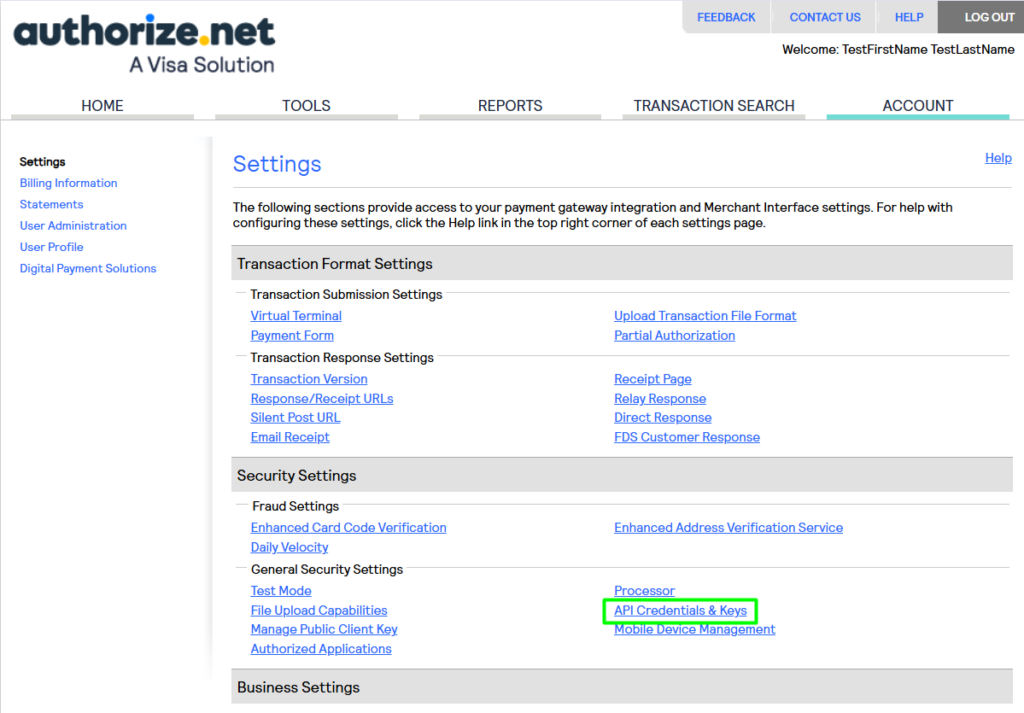
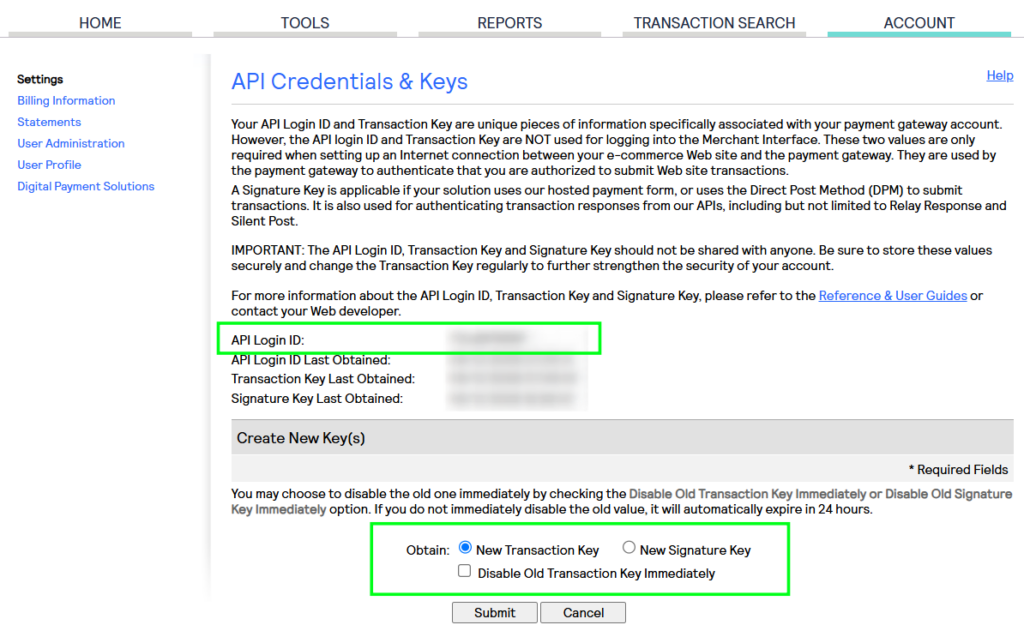
Log in to your Authorize.net account and go to Account → Settings → API Credentials & Keys. Here you need to copy/paste 3 main parameters:
Click “New Transaction Key” and copy both your API Login ID and your Transaction Key. Keep these credentials private — they authenticate all payment requests made on your behalf.
Step 3 — Connect in RentSyst
In your RentSyst account, navigate to Settings → Integrations → Payment Systems. Find Authorize.net in the list and click Connect.
Enter your API Login ID, Transaction Key and Signature Key – select the environment (Sandbox for testing, Production for live payments), and save. The connection is active immediately.
We recommend testing in Sandbox mode using the test card number 4111 1111 1111 1111 (CVV: 900, any future expiry date) before switching to Production.
The RentSyst × Authorize.net integration covers the full payment cycle for car rental operations — from the moment a booking is confirmed to the final settlement at vehicle return. Payment links, prepayments, refunds, card authorization, and deposit holds are all handled directly inside RentSyst, with no need for a separate payment tool or manual reconciliation.

Thank you!
Your email has been added to our database. Now you will be the first to receive interesting news about your business.